BoardSeal  ·  Official Platform Documentation  ·  Digital Governance Workspace
BOARDSEAL
BOARD
SEAL
Platform Documentation · Official Overview

Board documents.
Digital votes.
Sealed evidence.

BoardSeal manages the complete lifecycle of board documents — from composition to sealed PDF verification — in a single, auditable, unit-scoped platform.

Active Units
Organisational units
Documents
Executive documents managed
Recorded Votes
Approval & rejection records
PDF Snapshots
Sealed & hashed archives
01 Platform Overview

What BoardSeal does

BoardSeal is a controlled document management platform built for organisations that need traceable, auditable workflows around board decisions.

The platform is intentionally restrictive: no document can be altered once voting begins, no PDF can be overwritten once sealed, and no action goes unlogged.

  • F-01
    Unit-scoped administration

    Every organisational unit operates as an independent namespace. Documents, members, PDF renderers, and settings belong to a unit and are inaccessible outside it.

  • F-02
    Executive document management

    Documents carry a controlled set of fields: title, registration number, publication date, body text, structured decision lines, and an explicit list of allowed signers.

  • F-03
    Controlled voting lifecycle

    Opening a document for voting locks all content edits. Each assigned member casts exactly one vote — approve or reject. Suspension and resumption are available to moderators throughout.

  • F-04
    PDF generation and sealing

    PDFs are produced through versioned renderers assigned per unit. Each generation creates an immutable snapshot stored alongside a SHA-256 fingerprint — re-generation is additive, never destructive.

  • F-05
    Immutable audit event log

    Every meaningful action — creation, publication, state changes, PDF generation, downloads, and verification checks — is written to a permanent, append-only event log with timestamps and IP addresses.

  • F-06
    Public document verification

    A UUID-based verification endpoint lets any stakeholder confirm document integrity by comparing the live SHA-256 hash against the stored fingerprint — no account required.

02 Core Capabilities

Six modules, one controlled management cycle

Each capability closes a specific gap in the management chain — from authorisation through to sealed output.

Unit management

Named organisational units with logo, contact info, and member affiliation. Each unit is independent and isolated at every layer.

Executive documents

Structured documents with decision lines, signer scoping, voting state machine, and format versioning — built for board-level management.

Digital voting

Per-user approval and rejection with content lock-down during active voting. Full tally and progress visible in real time.

PDF sealing

Versioned renderers produce immutable PDF snapshots with SHA-256 fingerprints. Re-generation is always additive, never destructive.

Audit trail

Every state transition and document action is captured in an append-only event log with timestamps and originating IP addresses.

Public verification

UUID-based public verification pages compare live hash values against stored fingerprints — no account required for external stakeholders.

03 Operational Sequence

A linear, auditable lifecycle

The operational sequence is intentionally strict. Each phase closes before the next opens. No action is permitted out of order.

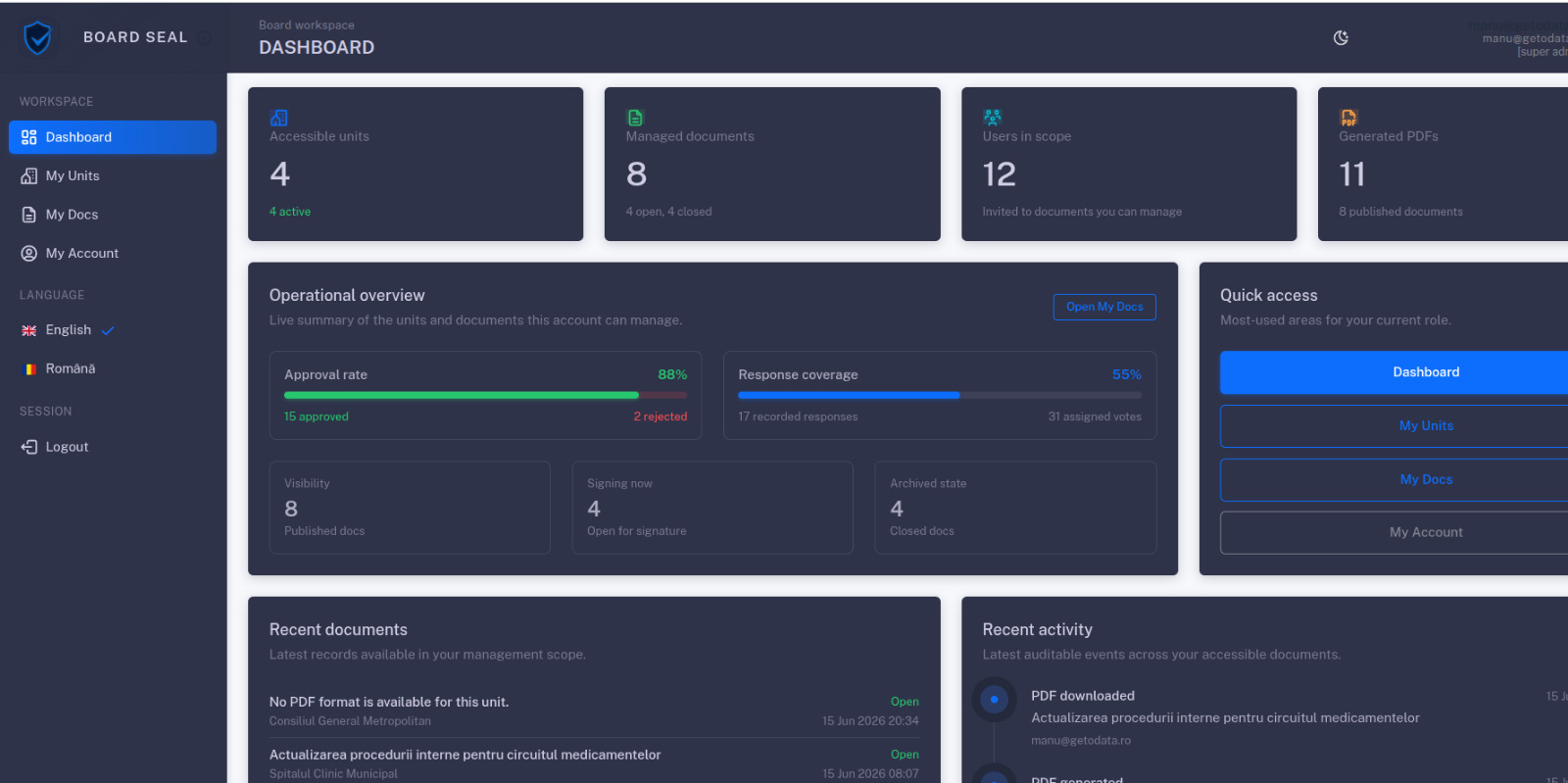
Interface preview
01
Unit activation

Activate the organisational unit, configure branding and contact information, assign moderators, and affiliate the member accounts that will participate in voting.

02
Document composition

A moderator fills in the registration number, dates, body text, structured decision lines, the list of allowed signers, and the PDF renderer to be used for final generation.

03
Voting opened

Publishing locks all content edits and makes the document visible exclusively to assigned members. Only voting state controls (suspend / resume) remain available to the moderator.

04
Vote collection

Each assigned member reviews the document and submits an approval or rejection. Progress is visible in real time. Each vote is immutable once submitted.

05
PDF generation and sealing

The moderator triggers generation. The selected renderer produces the PDF, which is stored as an immutable snapshot and fingerprinted with SHA-256. The hash is permanently linked to the document record.

06
External verification

The public verification page accepts the document UUID and performs a live hash comparison. The result — intact or altered — is returned without exposing raw file content or member data.

04 Security Controls

Controls built into every layer

Security is embedded in the authentication model, data access rules, document state machine, and generated outputs — not added as a surface feature.

Ref. Control Layer Description Active
S-01 SHA-256 integrity hashing System Every PDF snapshot is fingerprinted at generation time. The hash is stored separately and recalculated on every verification request to detect any modification.
S-02 Two-factor authentication User TOTP-based 2FA with backup codes for all user accounts. The 2FA session is independent of the primary credential and required separately on each login.
S-03 Role-based access control System Operators, moderators, and administrators hold scoped permissions. Document access is further restricted by unit affiliation and explicit allowed-signer assignment.
S-04 Immutable audit log System Audit events are append-only. No entry can be modified or deleted through the application layer. Every event captures a timestamp and originating IP address.
S-05 Email verification Auth All accounts require email confirmation before activation. Invitation tokens are time-limited and single-use. Password-set links follow the same token model.
S-06 Content lock-down on publication System Publishing freezes all content fields for all roles. No moderator or administrator can alter body text, decision lines, or signer lists once the document enters an open or closed voting state.
S-07 Scoped public access System Public verification endpoints expose only the hash comparison result and non-sensitive metadata. Raw PDF content and member data are never accessible through public routes.
05 Frequently Asked Questions

Common questions

Direct answers to the questions most frequently raised when evaluating the platform.

Technical stack
Django 5 Bootstrap 5 MySQL ReportLab SHA-256 TOTP 2FA PWA Python 3.12

Only users explicitly added to the document's allowed-signers list can see it in their workspace. This is enforced at the query level — no other unit member can access the document regardless of their role, even if they belong to the same organisational unit.

No. Publishing transitions the document into a locked state. All content fields — title, body, decision lines, allowed signers, and PDF format — become read-only for all roles, including administrators. The only remaining actions are suspend, resume, close, and PDF generation.

The hash is computed from the binary content of the PDF at generation time and stored in the database. On any verification request, the platform re-reads the file, recomputes the hash, and compares the result. Any byte-level alteration — accidental or deliberate — produces a mismatch and the verification page reports the document as modified.

Each sealed document has a unique UUID embedded in a shareable URL. Opening that URL in any browser — without creating an account — shows the document metadata, the verification result, and the list of signers. Raw PDF content and member contact data are never exposed through public routes.

Yes. Each unit is an isolated namespace: its documents, members, PDF formats, and settings are not accessible from any other unit within the same instance. A user affiliated with unit A cannot view, sign, or retrieve any document belonging to unit B.

English and Romanian are included as built-in translations. The language is determined by the URL prefix (/en/ or /ro/) and can be switched at any time without losing document context or session state.
Access the platform

BoardSeal — unit management, digital voting, and sealed PDF evidence in one auditable workspace.

Sign in to access your documents, or open the dashboard to manage units and the complete document lifecycle.